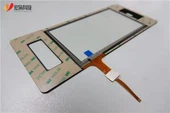

Capacitive screens need to achieve multi-touch by increasing the electrodes of mutual capacitance. Simply put, the screen is divided into blocks. Each set of mutual capacitance modules set in each area works independently, so the capacitive screen can Independently detect the touch conditions of each area, and after processing, simply realize multi-touch.
The capacitive technology touch panel uses the current induction of the human body to work. The capacitive screen is a four-layer composite glass screen. The inner surface and the interlayer of the glass screen are each coated with a layer of ITO. The outermost layer is a protective layer of silica glass with a thickness of only 0.0015mm. The interlayer ITO coating is used as the working surface, and the four corners lead out. Four electrodes, the inner layer of ITO is the screen layer to ensure the working environment.
When the user touches the capacitive screen, due to the electric field of the human body, the user's finger and the working surface form a coupling capacitor. Because the working surface is connected to a high-frequency signal, the finger absorbs a small current, which flows from the four corners of the screen. In theory, the current flowing through the four electrodes is proportional to the distance from the finger tip to the four corners. The controller obtains the position through precise calculation of the proportion of the four currents. It can reach 99% accuracy and has a response speed of less than 3ms.
The touch screen generally uses a serial port for signal transmission, and takes the signal from the PS/2 port, while the TPS screen takes power directly from the host power supply. If the indicator light is not on, it means that the signal has not been obtained, and the PS/2 line on the control box may be broken. If the light is on but still does not flash, the control box is broken, so users must replace the control box. If the replacement of the control box still does not work, it may be that the screen is pressed too tightly, and the surrounding screws need to be loosened slightly, because the touch screen is made of special materials and it is not easily damaged. If the serial port is broken or disabled, the driver cannot be installed because the serial port will be searched automatically when the driver is installed. Even if it can be installed, the mouse does not move or cannot be positioned. It is best not to use a serial mouse to judge the quality of the serial port. The 9 serial ports may use different methods for them. If the screen is pressed, or the ground wire is not connected properly, it will be unable to locate. If there are some areas that cannot be clicked or the response is slow, it may be affected by dust, and the casing needs to be disassembled to remove the dust.